Posts

Showing posts with the label MTN free browsing cheat

HOW TO BE ANONYMOUS DURING HACKING

Image
If you wish to start your career in the hacking domain, then the main thing you need to consider about is anonymity. So, what you need be concerned is how to be anonymous. The basic techniques of anonymous will be discussed. Let’s discuss A. VPN VPN is known as Virtual Private Network. 1) VPN The mobile or computer will get connected to a new network; we will be accessing the internet in the name of IP address provided by VPN provider. The VPN that your getting connected should be so secure enough or reputed one. Or else you’re in a vulnerability point of action. So always be cautious on connecting to any network. Let me tell you something about IP address. If you connected to the internet, then google “what is my IP” you will get your dynamic IP address which is given by your mobile network service provider which may change by an hour, a day no longer than that. Static Public IP is costly. If you are a broadband provider then you can have a one public static IP address, E...

How to use MTN 0.00kb Free Psiphon Settings for Browsing Cheat 2017 Via DataReset

Image
How to use MTN 0.00kb Free Psiphon Settings for Browsing Cheat 2017 Lately, I posted a lot of Airtel Psiphon Cheats, well today, with so much excitement I can tell you all that MTN 0.0KB free browsing cheat (DATARESET) is back. This time you can connect and browse via Psiphon VPN. Before now, it looked as if it was only Glo and Etisalat cheat are currently blazing after the Airtel Live 0.00 browsing cheat stopped working last week. The good news is that MTN Data reset that blazed last year is back again this year. I am here to show you the settings and configurations on how to use it to browse and download on your Android phone and PC. Due to the popularity of the MTN network it, therefore, means a wider range of coverage in the country. So expect a blazing fast Internet coverage while using this cheat. Let’s we proceed to the configuration and settings for this MTN DATARESET cheat REQUIREMENTS Psiphon  or  here  for PC...

⚡ New Jetride Vpn By Nonzo Working Flawlessly With Glo / Download Now ⚡

Image
What's up guys welcome to glid-techs no more time for talk so let's get down to business Requirements:  -Glo Sim (3G or LTE any)  -JetRide VPN, download one at play store  -Change your phone access point to 87.900.56.7:4444/@X and tick default and supl  After download open and set your jetRideVPN And save click and connect. VPN now connected and working

Latest Settings For Glo 0.0kb Free Browsing Using AnonyTun VPN

Image
It been a while now that I habe posted here in jackobian, now here I am back and due to a lot of requests made by many jkb on the settings used for anonytun vpn. Here I am going to Give you every Detail you need to know to make the latest Setting of Glo 0.00kb Free Browsing Stable with AnonyTun VPN. And if you have been faced with low connection before then today is actually your lucky day try this vpn and I bet you won't regret trying it out. Requirements:  -Glo Sim  -AnonyTun VPN  -Download anonytun vpn at play store Latest Settings For Glo 0.0kb Free Browsing Using AnonyTun VPN Here are the settings for Glo 0.00kb Free browsing, Carefully set AnonyTun VPN to start enjoy stable connection. first of All Download Tap to Open AnonyTun VPN Click on Stealth Settings. Turn on Stealth Tunnel. Change Connection Protocol to HTTP. Connection Port to 8080. Turn on Custom TCP/HTTP Headers and Click on Edit Custom TCP/HTTP Headers then set it as follows -URL/Host: redirect.gl...

Is Chrome OS right for you? A 3-question quiz to find out

Image
Google's Chrome OS is one of the world's most misunderstood computing platforms. Chromebooks are foundationally different from traditional PCs, after all -- and consequently, there are a lot of misconceptions about how they work and what they can and cannot do. Since people are always asking me whether a Chromebook might be right for their needs, I thought I'd put together a quick guide to help any such wonderers figure it out. Whether it's you or someone you know who's curious, the following three questions should help shed some light on what the platform's all about and for whom it makes sense.  1. Do you spend most of your time using the web and web-centric services? Think carefully here, as the answer might surprise you: What do you do most often on a computer? If the majority of your time is spent in a web browser -- whether it's reading news stories, surfing social media, or using web-centric services like Gmail and Google Docs -- ...

USB OTG Cable - 7 Important Things You Can Use it For On Android Devices

Image
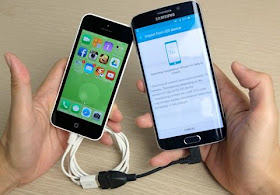
OTG is short for On The Go. USB OTG is a standard that enables devices to talk to one another. USB OTG Cable is an important tool to creates a link between your mobile phone and other computer peripherals such as USB flash drive, Mouse, Keyboard, Digital Camera, Game Pad, Card reader, External hard-drive etc. OTG Cable can do some really clever things and many people have never heard of it. If you don't know your OTG from your OMG, let's discover what it is and why it's so great. Below are the 7 important things which you can do with USB OTG Cable on your Android Devices 1. Share Battery Charge Between Two Android Devices For sharing the battery charge, all you need is a regular data/charger cable that you use to connect your smartphone to your PC and a standard USB OTG Host cable. If you do not have an OTG host cable, then you can buy them very cheap from any mobile store or from online shopping sites. When you have everything ready, connect the USB data c...

LATEST ETISALAT FREE BROWSING ON SMART PARK VIA XP PHISPHONE

Image
Hello guys,unlimited free browsing cheat is back again this time on XP Psiphon (one of the trusted FBT vpn). Don't get it twisted, the 'free browsing' tag doesn't mean it's completely free because you have to subscribe for the smartpak with a little money but trust me, what you gain is far more better. That's why i called it free browsing because it's almost free of charge. As of 2015, Etisalat SmartPak and socialme paks were the trending cheats as they lasted for almost one year. We were all using it. With just N150, you browse and download unlimited until the validation period reaches. Most of us utilized the opportunity to download as many stuffs as possible online. Thanks to Psiphon pro lite, simple server(now netloop) and Tweakware that time. Meanwhile, Etisalat noticed the loophole and decided to add speed throttling after using certain amount of data. Like that one wasn't enough, they drastically reduced the data allocation of the p...

list of working proxies and active ones

Image
24 hours back, I made a post on how to surf unlimited for free with Airtel sim. From the posted comments, I can see that some fans are not yet enjoying the tweak, due to the fact that the tweak is taking time to connect and some are complaining about often disconnection which is mostly caused by rusty 3G network in select areas. Remember that I told you not to put any airtime on your Airtel sim, you must not be on any active data plan, also, clear your Psiphon or any other VPN data and cache. Have airtime in your airtel SIM or active data plan is another major cause of often disconnection. At times, stuffed-up IP address (when lots of people are using one IP at the same time) can also be the cause of the issue. Note: The Airtel unlimited free browsing tweak is still blazing very well as at the time of publishing this post. Make sure you set your network mode to 3G or 4G LTE and if it still disconnects, kindly try another VPN with it. For those that are still complaining, cha...

HOW TO BROWSE FASTER ON YOUR MTN SIM

Image
You are here probably because your MTN browsing is not fast and I want to assure you that you are in the right place at the right time because I have a very simple trick for you that can help boost your browsing experience with your on MTN with your mobile phone. MTN is undoubtedly, one of the best (if not the best) networks with widest coverage areas in Africa and Nigeria in particular. Lately, the network has improved dramatically when its rivals are still battling with poor signal coverage. However, that doesn't mean there aren't places with terrible mtn network coverage and in some cases, even some people in the areas with good coverage still get complains of slow browsing experience or Internet connection and you start wondering why it's like that. Well, atimes, we are the cause of some minor things that happens with our gadgets. In this post, I will reveal a simple tick you should apply to effect the change from slow to fast browsing experience on MTN ...
Image
Airtel latest free browsing cheat It has been a while that we have enjoyed Airtel free browsing tweak. I'm glad to inform you that Airtel free browsing and unlimited downloading is back and better, blazing very well via modded VPNs such as Sypon Shield, Psiphon Handler, Psiphon A+ Pro, Queencee, XP Psiphon, Pronet, Netify, UC Mini Handler etc. The tweak is working flawlessly with the Airtel Sim card, it is good for unlimited downloading/streaming and it can be used to power all the apps on your Android smartphone. You can also enjoy it on your PC via tethering. To enjoy the tweak, download any of the aforementioned VPN. Take Note of This: Make sure you don't put any airtime on your Airtel sim, you must not be on any active data plan, also, clear your Psiphon or any other VPN data and cache. Set your phone APN to the default.

Airtel Live 0.00kb Free Browsing Cheat On PC Using Psiphon

Image
Enjoy Airtel Live 0.00kb Free Browsing Cheat On PC Using Psiphon Airtel Live 0.00kb free browsing cheat on android using Psiphon VPN apk app is still blazing and I know a lot of you guys are still flexing it. If you don't know about it then check  HERE for Airtel Live Latest Free Browsing Using Psihon VPN. If you are having problems with disconnection, Then check out  List of Stable IP And Ports For Airtel Live 0.00 Free Browsing Tweak . First off, for you to enjoy this free browsing cheat on you laptop or desktop, you need your Modem/MiFI or Smartphone Hotspot, a personal laptop, or desktop PC, your Airtel SIM card with 0.00kb balance, plus you must have a stable 3G or 4G network for user experience.  Now download Psiphon handler exe for PC from  HERE  just in case you don't have it before  After download installed it and then connect you Modem/MiFI or Smartphone Hotspot. Try locating  “Upstream...

Psiphon A+ Airtel latest free browsing cheat

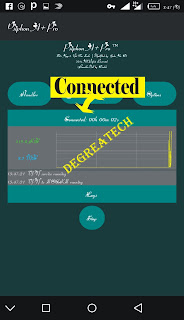
Hello guys! It has been a while that we have enjoyed Airtel free browsing tweak. I'm glad to inform you that Airtel free browsing and unlimited downloading is back and better, blazing very well via modded VPNs such as Sypon Shield, Psiphon Handler, Psiphon A+ Pro, Queencee, XP Psiphon, Pronet, Netify, UC Mini Handler etc. The tweak is working flawlessly with the Airtel Sim card, it is good for unlimited downloading/streaming and it can be used to power all the apps on your Android smartphone. You can also enjoy it on your PC via tethering. To enjoy the tweak, download any of the aforementioned VPN. Take Note of This: Make sure you don't put any airtime on your Airtel sim, you must not be on any active data plan, also, clear your Psiphon or any other VPN data and cache. Set your phone APN to the default.
Related Posts Plugin for WordPress, Blogger...